 NyasaCloud
If you’ve ever tried to pick a hosting plan and ended up more confused than when you started, you’re not alone. Terms like “shared hosting,” “VPS,” and “cloud hosting” get thrown around constantly — but what do they actually mean for your website? And more importantly, which one should you be paying for?
This guide breaks it all down in plain language, with real examples so you can make a confident decision.
The Big Picture: What Is Web Hosting, Really?
Before diving into the types, let’s make sure we’re on the same page about what hosting actually is.
When you build a website, all the files that make it up — the images, pages, code, and databases — need to live somewhere so that people can access them from anywhere in the world. That “somewhere” is a web server: a powerful computer that stays switched on 24 hours a day, 7 days a week, connected to the internet.
Web hosting is simply the service of renting space on one of those servers.
Now, the way that server space is organised and allocated is what separates the different types of hosting.
Shared Hosting: The Affordable Starting Point
What it is
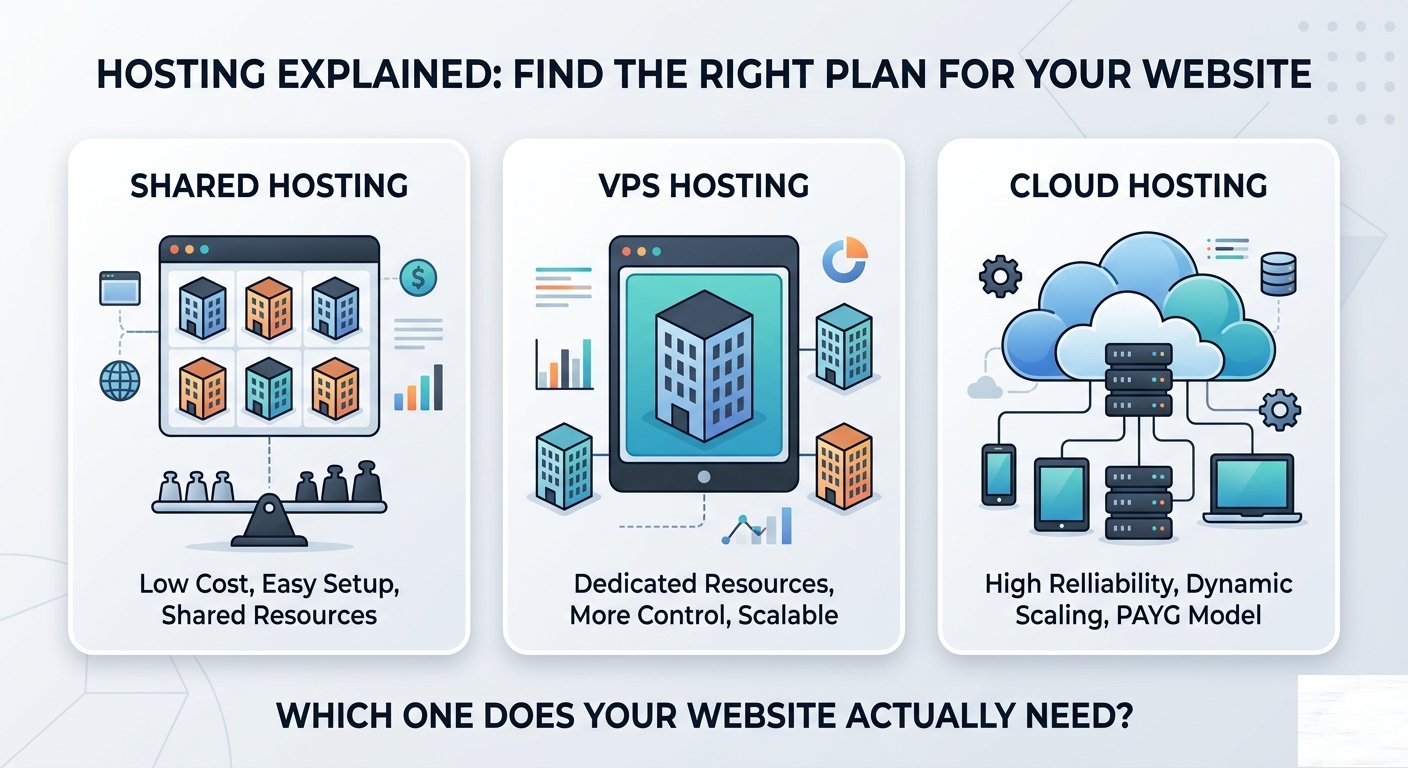
With shared hosting, your website lives on a server alongside hundreds or even thousands of other websites. Everyone shares the same pool of resources — CPU power, RAM, and storage — the same way tenants in a block of flats share the same water supply and electricity grid.
Who it’s perfect for
- Personal blogs and portfolio websites
- New businesses launching their first site
- Small informational websites (churches, community groups, local shops)
- Anyone on a tight budget who is just getting started
The advantages
Cost. Shared hosting is by far the most affordable option. Because the server costs are split among many customers, you can get a fully functional hosting plan at a fraction of what a private server would cost.
Simplicity. Everything is managed for you. Server software, security patches, technical maintenance — the hosting company handles it all. You focus on your website; we handle the infrastructure.
Ease of use. Shared hosting plans typically come with a control panel (like cPanel) that makes managing your website, emails, and databases straightforward, even without any technical background.
The limitations
Shared resources. If another website on the same server suddenly gets a surge of traffic, it can temporarily slow down your site too. This is sometimes called the “noisy neighbour” problem.
Limited scalability. There’s a ceiling on how much traffic your site can handle. Once you start growing significantly, you’ll likely need to upgrade.
Less control. You can’t install custom server software or change server-level configurations. What you see is what you get.
The verdict
Shared hosting is the right call when you’re starting out, running a low-to-medium traffic website, or simply want something affordable and easy to manage. Most small Malawian businesses are perfectly served by a good shared hosting plan.
VPS Hosting: Your Own Corner of the Server
What it is
VPS stands for Virtual Private Server. The technology behind it is called virtualisation — the same physical server is divided into multiple isolated “virtual” machines, each acting as its own independent server.
Think of it like moving from a block of flats (shared hosting) into a townhouse. You still share the same building structure, but you have your own completely separate space, your own front door, and nobody else can access what’s inside.
Who it’s perfect for
- Growing businesses with increasing traffic
- Developers who need to install custom software or frameworks
- E-commerce stores with a catalogue of products
- Applications that need guaranteed performance
- Businesses handling sensitive customer data
The advantages
Dedicated resources. The CPU and RAM allocated to your VPS are yours alone. A spike in traffic on someone else’s VPS has zero impact on yours.
Root access and full control. You can install any software you want, configure the server exactly how you need it, and have complete administrative control — just like owning your own server.
Scalability. Need more RAM or storage? VPS resources can typically be upgraded without migrating your site or taking it offline.
Better performance. Because you’re not sharing resources, your site responds faster and more consistently.
The limitations
Cost. VPS hosting costs significantly more than shared hosting. It’s an investment that makes sense once your website is generating value.
Technical knowledge required. With great power comes more responsibility. You’ll need some comfort with server management, or you’ll need to choose a managed VPS plan where the hosting company handles the technical side.
Overkill for small sites. If your website gets a few hundred visitors a month, a VPS is simply more than you need.
The verdict
VPS hosting is the right step up when your website has outgrown shared hosting, when you need more control, or when your business relies on consistent, high-performance uptime. It’s also the go-to choice for developers building and deploying custom applications.
Cloud Hosting: Scalability on Demand
What it is
Cloud hosting takes the VPS concept further. Instead of running on a single physical server, your website runs across a network of interconnected servers — the “cloud.” Resources are pooled and allocated dynamically.
The best analogy: imagine instead of renting a fixed room, you have access to every room in an entire hotel, and you only pay for the rooms you actually use on any given night.
Who it’s perfect for
- Websites with unpredictable or seasonal traffic spikes
- Large organisations with high availability requirements
- Applications that need to scale rapidly
- Teams running multiple services that need to communicate
The key advantages
Elastic scaling. If your website suddenly goes viral or gets featured in a national newspaper, cloud infrastructure can automatically handle the surge and scale back down once things quieten.
High availability. Because your data is spread across multiple servers, there’s no single point of failure. If one server goes down, another picks up instantly.
Pay-as-you-use pricing. In true cloud setups, you pay for what you consume rather than a fixed monthly amount.
Side-by-Side Comparison
| Shared Hosting | VPS Hosting | Cloud Hosting | |
|---|---|---|---|
| Cost | Low (K4,500–K30,000/mo) | Medium–High (K39,000+/mo) | Variable |
| Performance | Good for low traffic | Consistent, strong | Excellent |
| Control | Limited | Full root access | Full |
| Scalability | Limited | Manual upgrades | Automatic |
| Technical skill needed | None | Some (or managed) | Moderate–High |
| Best for | Startups, blogs, small sites | Growing businesses, apps | Enterprise, high-traffic |
So, Which One Should You Choose?
Here’s a simple way to decide:
Start with shared hosting if:
- You’re launching your first website
- You expect fewer than 10,000 visitors per month
- You want something simple and affordable
- You don’t need to install custom server software
Move to VPS hosting if:
- Your site is growing and performance is suffering
- You’re running an e-commerce store
- You need custom software or server configurations
- You want guaranteed resources and better security
Consider cloud hosting if:
- You’re running a large-scale application or platform
- Your traffic is unpredictable or can spike dramatically
- Downtime is simply not an option for your business
Final Thoughts
The good news is that you don’t have to get this perfect from day one. Most businesses start on shared hosting and migrate upward as they grow. What matters most is getting online with a reliable plan that fits where you are right now.
At Nyasa Cloud, all our plans — from Kalulu shared hosting to our Njovu VPS — are designed to grow with you, with easy upgrade paths and migrations handled by our team. You’ll never have to start from scratch when it’s time to level up.
Ready to find your plan? Browse our hosting plans or get in touch and we’ll point you in the right direction.