 NyasaCloud
If you’ve ever noticed the little padlock icon next to a website address in your browser, you’ve already seen SSL in action. But what is it actually doing, why does it matter for your business, and what are the consequences of not having it?
This guide answers all of those questions in plain language; no technical degree required.
Starting from the Beginning: How the Web Transfers Data
When you visit a website, your browser is constantly having a two-way conversation with a web server. You request a page; the server sends it back. You fill in a form; the data travels back to the server. You log into your account; your username and password are transmitted across the internet.
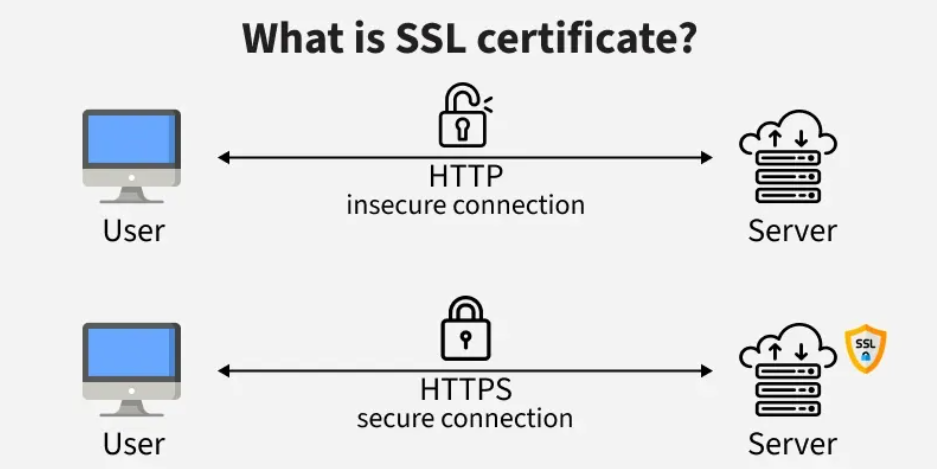
Here’s the problem: by default, this conversation happens in plain text. Imagine writing a letter, slipping it into a transparent envelope, and sending it through a postal system where anyone along the route can read exactly what’s inside. That’s what unencrypted web traffic looks like.
SSL (Secure Sockets Layer), more accurately called TLS (Transport Layer Security) in its modern form, solves this by encrypting the conversation. The data is scrambled into unreadable code before it leaves your browser and can only be unscrambled by the intended recipient. Anyone who intercepts it along the way sees nothing but meaningless gibberish.
When SSL is active on a website, the address changes from http:// to https:// the “S” stands for Secure.
What Does an SSL Certificate Actually Do?
An SSL certificate does two important things:
1. It encrypts data in transit. Everything passing between your visitor’s browser and your server is encrypted. Login credentials, form submissions, payment details, personal information — all protected.
2. It authenticates your server’s identity. The certificate proves to visitors’ browsers that they are genuinely talking to your server and not to an impersonator. This protection against “man-in-the-middle” attacks – where a malicious party secretly intercepts communication between two parties – is just as important as the encryption itself.
An SSL certificate is issued by a Certificate Authority (CA), a trusted third party that has verified the certificate is legitimate. When a browser connects to your site, it checks the certificate against known CAs to confirm it’s genuine.
Why Your Website Absolutely Needs HTTPS
1. Your Visitors See a “Not Secure” Warning Without It
Modern browsers – Chrome, Firefox, Safari, and Edge – all display a prominent warning when a visitor tries to access a website that doesn’t use HTTPS. In Chrome, this appears as “Not Secure” in red text next to the address bar. On some pages, there’s an even more alarming full-page warning.
For a business trying to establish credibility and trust online, having “Not Secure” stamped next to your brand name is a serious problem. Many visitors will immediately leave rather than risk their information.
2. Google Penalises Sites Without HTTPS
Google has used HTTPS as a ranking signal since 2014 and has become progressively stricter about it over time. All else being equal, a site with HTTPS will rank higher in Google search results than the same site without it.
Given how important Google search traffic is for most businesses, this alone is reason enough.
3. It’s Required for Accepting Payments
If your website takes any form of online payment, you are required by payment card industry standards (PCI DSS) to use HTTPS. Payment processors like Stripe, PayPal, and local Malawian payment gateways will not work correctly or at all on non-HTTPS sites.
4. It Protects Your Visitors and Your Reputation
Even if you’re not handling payments, your visitors may submit their name, email address, phone number, or other personal information through your website. Without HTTPS, this information is transmitted in plain text and could potentially be intercepted.
If a security incident occurred because your site was unencrypted, the reputational damage and potential legal exposure could be significant.
5. Browser Features Require It
Many modern browser features, including geolocation, push notifications, payment APIs, and camera/microphone access, are deliberately restricted to HTTPS sites. If you ever want to add any of these capabilities to your website, you’ll need HTTPS already in place.
Types of SSL Certificates
Not all SSL certificates are the same. Here’s what the different types mean:
Domain Validation (DV) Most Common
This is the standard certificate that most websites use, including all Nyasa Cloud plans. The certificate authority simply verifies that you control the domain name. It takes minutes to issue and is entirely sufficient for the vast majority of websites.
It provides the same encryption as higher-level certificates. The difference is only in how much identity verification was done, not how strong the security is.
Best for: Most websites, blogs, informational sites, small e-commerce stores.
Organisation Validation (OV)
In addition to domain control, the certificate authority verifies that a legitimate, registered organisation owns the domain. This involves checking company registration records. It takes a few days to issue and costs more.
Visitors can click on the padlock icon and see your verified organisation name in the certificate details.
Best for: Businesses that want to demonstrate additional legitimacy.
Extended Validation (EV)
The most rigorous verification process. The CA performs thorough checks of your organisation’s legal, physical, and operational existence. Historically, EV certificates displayed a green bar with the company name in browsers, though most modern browsers have removed this visual distinction.
Best for: Banks, financial institutions, large e-commerce platforms.
Wildcard Certificates
A wildcard certificate covers a domain and all its subdomains with a single certificate. For example, a wildcard for *.nyasacloud.mw would cover host.nyasacloud.mw, mail.nyasacloud.mw, www.nyasacloud.mw, and any other subdomain.
Best for: Businesses managing multiple subdomains.
Do You Have to Pay for SSL?
Not necessarily. Here’s how it breaks down:
Free SSL (Let’s Encrypt) Let’s Encrypt is a non-profit certificate authority that provides free, automatically-renewing DV certificates. All Nyasa Cloud hosting plans include a free Let’s Encrypt SSL certificate, automatically installed and renewed. For most websites, this is entirely adequate.
Paid Certificates Commercial certificates from providers like DigiCert, Comodo, or GlobalSign cost anywhere from a few hundred kwacha to tens of thousands per year. They offer extended validation options, warranty coverage, and sometimes slightly more comprehensive customer support. For most small to medium businesses, these extras aren’t necessary.
The encryption strength between a free and a paid DV certificate is identical. The differences are in validation level, warranty, and support.
How to Check If Your Site Has SSL
Check the URL: Does it start with https:// rather than http://?
Look for the padlock icon: In Chrome and most browsers, a locked padlock appears to the left of the URL when SSL is active.
Test with a free tool: SSL Labs (ssllabs.com/ssltest) gives you a detailed grade and analysis of your certificate and configuration.
If you find that your site is on HTTP or that your SSL certificate has expired (they typically need renewal every 90 days for Let’s Encrypt or 1–2 years for commercial certificates), you need to fix this immediately.
Common SSL Problems and How to Fix Them
Mixed Content Warnings
Even if your site is on HTTPS, you might still see a warning if some elements on your page, images, scripts, or stylesheets, are loaded over HTTP:// rather than HTTPS://. This is called “mixed content”.
The fix: update all internal links and media references on your site to use https://. In WordPress, the Really Simple SSL plugin can handle this automatically.
Expired Certificate
SSL certificates have expiry dates. If your certificate expires and isn’t renewed, visitors will see a security error page. Most modern hosting setups (including Nyasa Cloud) auto-renew Let’s Encrypt certificates before they expire.
Check your certificate’s expiry date at ssllabs.com or through your hosting control panel.
Certificate Not Trusted
This usually means the certificate was self-signed (not issued by a trusted CA) or the certificate chain is incomplete. Use a certificate from a trusted CA and make sure the full chain is installed.
Redirect Loops
When you switch from HTTP to HTTPS, you should set up a redirect so anyone visiting http://yoursite.com is automatically sent to https://yoursite.com. If this redirect isn’t configured correctly, it can create loops. Your hosting control panel should have a simple one-click option to force HTTPS.
Setting Up SSL: What to Expect
If you’re on a Nyasa Cloud hosting plan, SSL is included free with every plan and is activated with a single click from within cPanel or automatically on new WordPress installations.
If you’re migrating an existing site to HTTPS, here’s the general process:
- Install the SSL certificate (or confirm it’s already installed)
- Update your website’s URL setting from
http://tohttps:// - Set up a permanent redirect from HTTP to HTTPS
- Fix any mixed content warnings
- Update your sitemap and inform Google Search Console of the change
For most WordPress sites, this process takes less than 30 minutes with the help of a plugin like Really Simple SSL.
Final Thoughts
SSL/HTTPS is no longer optional. It’s a fundamental baseline requirement for any website for security, for user trust, for Google, and for compliance.
The good news is that getting SSL sorted has never been easier or more affordable. Free, automatic certificates from Let’s Encrypt mean there’s no cost barrier, and modern hosting platforms install and renew them without you having to lift a finger.
If your site is still on HTTP, fixing that should be at the top of your to-do list before any design tweaks, before new content, before anything else.
All Nyasa Cloud hosting plans include a free SSL certificate, automatically installed and renewed. Get started with a plan and your site will be secured from day one.